


Building codes affect everyone. Diagrams translate them into clear, helpful visuals.
Even for experienced architects, working with building codes can be burdensome. Designing buildings is a creative, highly visual process. Fittingly, most AEC professionals are visual learners.
Yet code is written in dense legal text that’s difficult to visualize, often with no illustrations at all. That’s challenging for architects during the planning process, and for clients who are trying to grasp constraints on their project’s design.
That’s why UpCodes augments our code library with original diagrams, drafted by a team of experts. Diagrams means our library isn’t just faster to access, it makes code easier to understand.
Albert DeLima is an architect and code consultant who works with UpCodes on our diagrams. Today, we’re going in-depth with DeLima on his team’s diagram creation process.
.png)
Safety and compliance in three dimensions
Building code is the foundation of safe, compliant buildings, so we all win when it’s easier to understand. “We provide diagrams to give clarity,” Albert DeLima says. “I hope even a layperson could understand them, but they’re especially geared towards young architects and engineers.”
“UpCodes is a tremendous tool for older architects to quickly explain things to younger architects – I use it often with interns. You don’t have to create a diagram on a piece of trace by hand to explain the relationships between codes.” - Albert DeLima, CEO at WA Associates
In UpCodes, some diagrams are in 3D, while others are conventional 2D representations. When creating a new diagram, DeLima keeps the audience in mind:
→ Basic codes for single-family dwellings might be viewed by homeowners, not just architects, so they should be easier to understand.
→ A diagram illustrating a single detail might be sufficient in 2D, while one showing an entire building needs more information.
Visual clarity for clients and architects
Diagrams also support collaboration with other stakeholders, like building officials and clients. In particular, they make it easier to explain why changes may be needed to meet safety and compliance requirements.
“Diagrams provide an excellent talking point when there’s a misunderstanding. It’s quick to pull up on your screen and point out the elements in question,” says DeLima. “In particular, 3D diagrams show the spatial relationships a project will encounter in the real world.”
Example: Atrium safety code
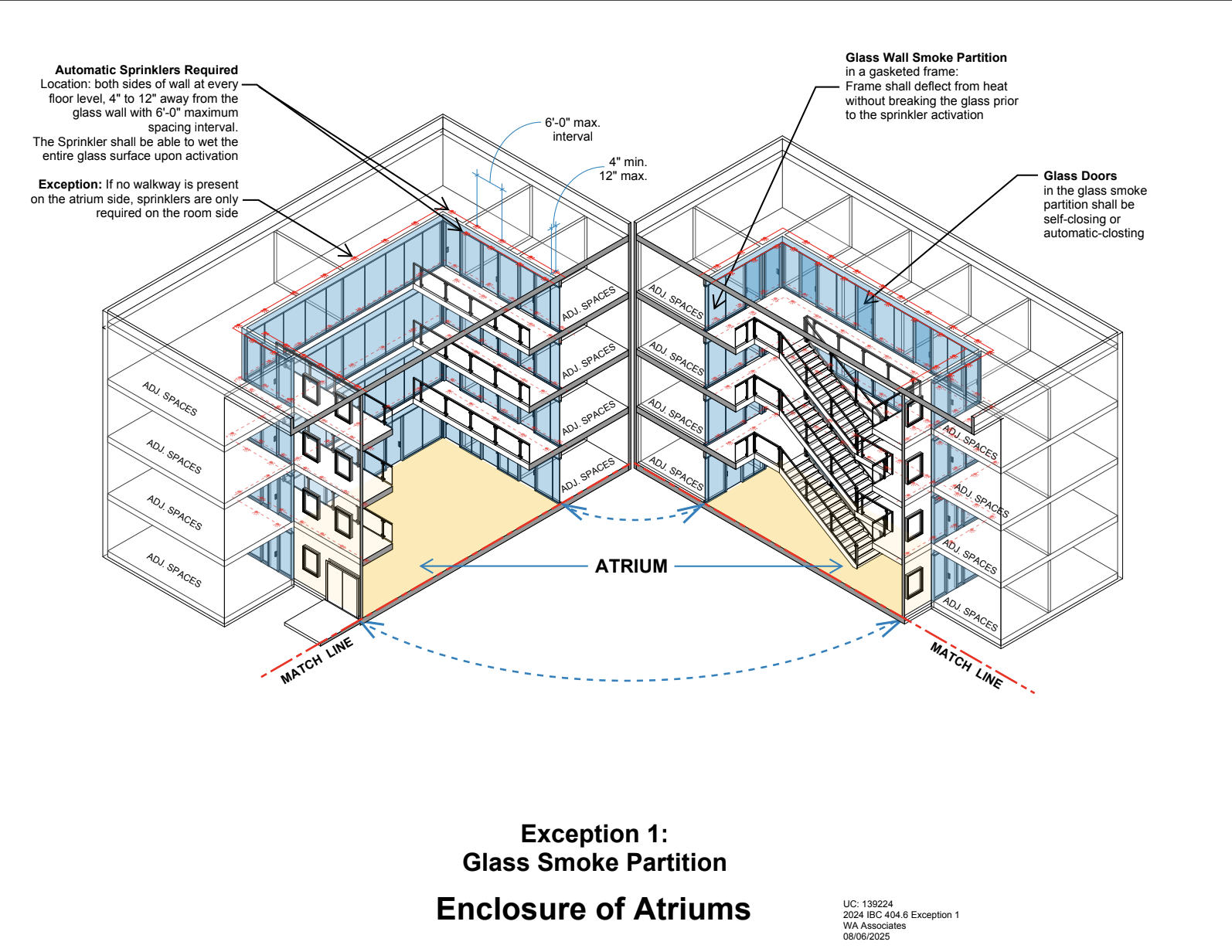
This diagram, for an atrium enclosure, will likely be viewed by a professional audience of architects and builders. So, DeLima designed it with as much detail as possible.
Within the 3D cross-section view, the diagram shows how code regulates both simple and complex atrium designs. For example, glass-enclosed and glass-block diagrams are regulated differently. With certain smoke-control systems, the atrium may need to be enclosed in a different way.
How an UpCodes diagram is built
Not every section of code needs a diagram. UpCodes prioritizes which codes should be illustrated based on user requests, code sections that are especially difficult to explain, or impact on building safety.
Depending on the needs of the code, DeLima may start by 3D sketching in Revit, or 2D sketching by hand. “That’s the first thing we look at – is this a small detail, or a big voluminous area that could benefit from 3D?” he says.
The sketch is translated into a BIM model by DeLima’s in-house team. Then, it’s quality-checked by his peers at the firm, and augmented with a short text description. “For obvious reasons, we always quality-check each others’ work,” he says.
Finally, the sketch is illustrated by UpCodes in our graphic style. Once in the library, the diagram is cross-linked to other code sections that relate to its contents. As users share feedback on how they use diagrams, they’re updated regularly to be more helpful. And of course, they’re updated as codes change.
“We’re going from text to graphics with no reference. Figuring out how to communicate the codes’ meaning can be tricky. I also avoid looking at existing graphic interpretations to avoid tainting our work.” - Albert DeLima, CEO at WA Associates
Clearer codes, safer buildings
Albert feels that many architects do just see compliance as a formality.
“Codes are the minimum safety standards society has put on us as architects. I believe in striving to do better than code, where I can. For new architects, some areas of code don’t feel intuitive, like accessibility or egress,” he says. “Yet they’re ensuring you can get people in and out of the building safely.” - Albert DeLima, CEO at WA Associates
In addition to creating diagrams for UpCodes, he uses the tool in his own professional practice. He especially likes the Projects feature for organizing all sections of code relevant for a building, keeping them easily accessible.
In the future, DeLima notes that he’d be excited to see animated diagrams that would allow users to zoom in and rotate around structures. That’s not reality yet—but right now, UpCodes aims to keep making code compliance as smooth and low-friction as possible for architects, builders, and clients.
new content.